 spitball
THE SHORT VERSION
What to take away
- Capture each idea the moment it appears, in the fastest form you have; for most people that's speaking, not typing.
- Working memory holds about four chunks on average, and unfinished goals cause intrusive thoughts, so a brain is a poor place to park ideas.
- Offloading ideas to a note or recording helps, but only when you trust the place you save them and actually go back to it.
- Say three things when you capture: the idea, why it matters, and a possible next step. One idea per note.
- Review your ideas weekly in 15 minutes: act on it, park it, or let it go. A specific next step lets your mind move on.
WATCH THE IDEA
The idea-capture loop, in 30 seconds
A short illustrated clip of a four-step idea-capture loop: capture each idea the moment it appears, in your voice if you can; add one line of context (the idea, why it matters, the next step); keep everything in one trusted place; and review weekly to keep, park or let go.
Read the video transcript
This video has no narration. Pip, the Spitball paper-ball character, leaps up and catches a paper airplane just as its trail starts to fade. Then four paper cards labeled Capture, Context, Review and Act light up in turn around Pip in a loop. Next, Pip taps a pinned index card that reads: Idea: Sunday dinner club. Why: see friends more. Next: text 3 people. Finally, Pip sits at a desk with tea, sorting paper cards into a starred tray, a clock tray and a recycling bin beneath a weekly calendar. Captions: An idea shows up. Catch it before it flies off. Capture it the moment it appears, in your voice if you can. Then run a simple loop: capture, context, review, act. Keep every idea in one place you trust. Add one line of context: the idea, why, and the next step. Small, specific next steps turn ideas into action. Once a week, review: keep it, park it, or let it go. Capture fast. Review often. Good ideas don't wait.
To capture ideas before you forget them, save each one the moment it appears, in the fastest form you have (usually your voice), add one line of context, and keep everything in one place you review every week. Capture is the easy half. Review is what turns ideas into action.
This guide is for anyone whose best ideas show up at inconvenient times: on a walk, in the shower, halfway through a meeting, or just as you're falling asleep. It explains why ideas slip away so fast, what the research on "cognitive offloading" says about writing things down, and a four-step system you can start today: capture, context, review, act. Spitball is our app, so where we mention it we've kept to what it actually does.
Research claims link to the original papers. Apple details come from Apple's iPhone User Guide (iOS 27), checked October 21, 2026. Spitball details come from Spitball's published support and privacy pages.
Why do good ideas disappear so fast?
Good ideas disappear because the part of your mind that holds them in the moment is small and busy. A new thought sits in working memory, and anything else that grabs your attention can push it out before it's stored anywhere durable.
Psychologists have spent decades measuring how much that "in the moment" memory holds. In a widely cited review, Nelson Cowan argued that the true limit is smaller than the famous "seven, plus or minus two": a central capacity limit that averages "about four chunks" (Cowan, 2001, Behavioral and Brain Sciences). Four chunks is not much when you're also following a conversation, reading a street sign or replying to a text.
There's a second problem. Unfinished business doesn't go quiet. In a series of studies, E. J. Masicampo and Roy Baumeister found that unfulfilled goals caused "intrusive thoughts during an unrelated reading task" and hurt performance on an unrelated anagram task (Masicampo & Baumeister, 2011, Journal of Personality and Social Psychology). An idea you're trying to hold on to competes with whatever you're doing now, and often both suffer. Psychologists call this persistence of unfinished business the Zeigarnik effect, which the paper names as its starting point.
So the problem isn't that you have bad memory. It's that a brain is a poor place to park a half-formed idea. The fix is to move the idea somewhere else, quickly and reliably.
What is cognitive offloading, and does writing ideas down actually help?
Cognitive offloading is using something outside your head, such as a note, a reminder or a recording, to reduce what your mind has to hold. Researchers Evan Risko and Sam Gilbert define it as "the use of physical action to alter the information processing requirements of a task so as to reduce cognitive demand" (Risko & Gilbert, 2016, Trends in Cognitive Sciences). Their example will feel familiar: programming a smartphone to remind you of an appointment.
The evidence that offloading helps is good, with some caveats worth knowing:
- Offloading helps people follow through. A 2023 review of research on "intention offloading" (external reminders for things you plan to do) concluded that it "is highly effective" (Gilbert et al., 2023, Psychonomic Bulletin & Review).
- It levels the playing field. In a study of 268 participants, people with higher working memory fulfilled more intentions when relying on their own memory, "but this difference was eliminated when offloading was permitted" (Ball et al., 2022, Memory).
- It frees you to think about the next thing. Across three experiments, saving one file before studying a new one "significantly improved memory for the contents of the new file" (Storm & Stone, 2015, Psychological Science).
- Doubt is a good trigger. In a 2024 study of real-world plans, people were more likely to set reminders for plans they were less confident they'd remember, and, for a plan to return to a follow-up survey, setting a reminder predicted actually doing it (Scott & Gilbert, 2024, Journal of Experimental Psychology: Applied).
The caveat matters as much as the findings. In the Storm and Stone experiments, the benefit "was not observed when the saving process was deemed unreliable." Offloading only works when you trust the place you're offloading to. A capture habit that loses things, or that you never open again, gives you the effort without the relief. Most of the rest of this guide is about building a place you can trust.
What's the fastest way to capture an idea?
The fastest way to capture an idea is the one that starts with the fewest steps, and for most people that's speaking. You can talk faster than you can type, you can do it while walking, and you don't have to find the right words before you start.
How much faster? In a lab study on an iPhone 6 Plus, English speech input using Baidu's Deep Speech 2 recognizer was 2.93 times faster than Apple's on-screen keyboard (153 vs. 52 words per minute) for short messages, though the speech transcripts kept slightly more uncorrected errors (1.30% vs. 0.79%) (Ruan et al., 2017, Proceedings of the ACM on Interactive, Mobile, Wearable and Ubiquitous Technologies). The authors call these "upper-bound" lab results, so treat the number as a ceiling, not a promise. The direction is the useful part: speaking removes friction at exactly the moment friction kills ideas.
Use this rule: if you can capture it in under 10 seconds, you will. If it takes longer, you'll tell yourself you'll remember. The quickest routes are:
- The Action button, on iPhone models that have one. Press and hold to run the action you choose in Settings > Action Button. Apple describes the Voice Memo option as "Record personal notes, musical ideas, and more," and the Shortcut option as "Open an app or run your favorite shortcut" (Apple: Use and customize the Action button). Our guide to recording a voice memo with the Action button lists which iPhones have one.
- Voice Memos on your first Home Screen. Apple pitches it for "personal notes, classroom lectures, musical ideas, and more" (Apple: Make a recording in Voice Memos).
- A quick-capture app. In Spitball you can record or type a thought in the app, or set the Action button to Spitball's capture shortcut: press and hold to start recording, then press and hold again to finish and save (Spitball Support).
- Typing, when you can't speak: in a quiet office, on a train, or late at night next to someone sleeping.
- Paper, if you always carry it: a pocket notebook or index cards. Just make sure paper ideas reach your one inbox during the weekly review.
Pick one primary route and make it automatic. Switching between three capture methods means three places to check later, which undermines the trust that makes offloading work.
What does a simple idea-capture system look like?
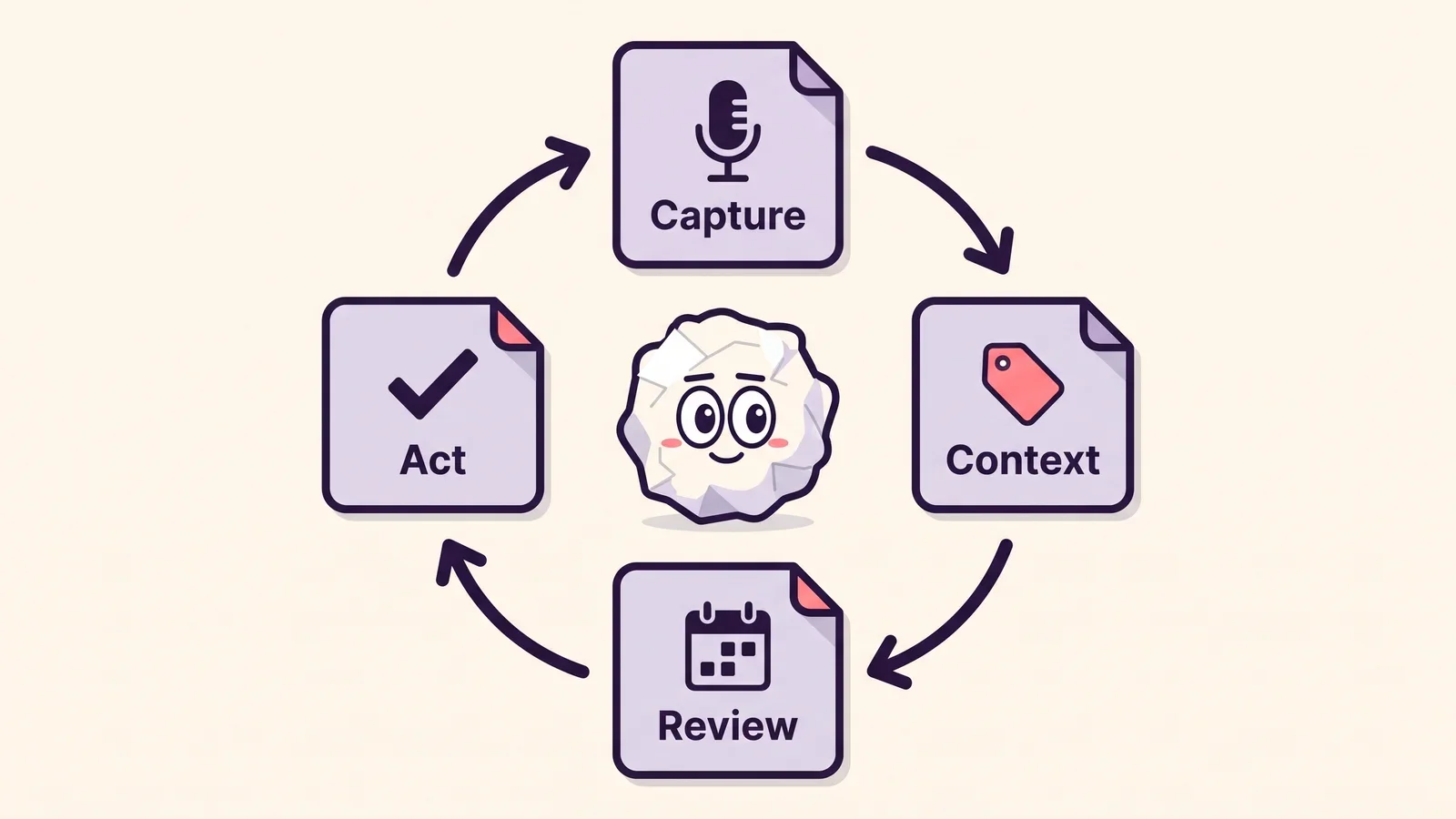
A simple idea-capture system has four steps that repeat: capture, context, review and act. Each step is small on its own; together they turn a fleeting thought into something you can actually use.
- Capture. Save the idea immediately, in its roughest form. Don't judge it, title it or file it yet. Speed beats quality here.
- Context. Add one line that future you will need: why it matters or what prompted it, and a possible next step. Usually you can say this in the same breath as the idea.
- Review. On a fixed schedule, look back over what you captured. Most systems fail here, not at capture.
- Act. For each idea worth keeping, decide the next physical step and put it where you'll see it: a calendar, a task list, a message to someone.
Two design choices make the loop hold up over months:
- One inbox. Every idea goes to the same place first, whatever it's about. You can sort later; you can't sort what you've lost.
- Small, fixed review times. A 15-minute weekly slot you keep beats an ambitious daily routine you skip.
If you've read about bigger personal-knowledge systems, this is deliberately the minimum version. You can add tags, projects and archives later. The loop above is what has to work first.
What should you say when you capture an idea?
Say three things: the idea, why it matters, and the next step if you know it. That takes about ten seconds and makes the difference between a note you understand next week and one you don't.
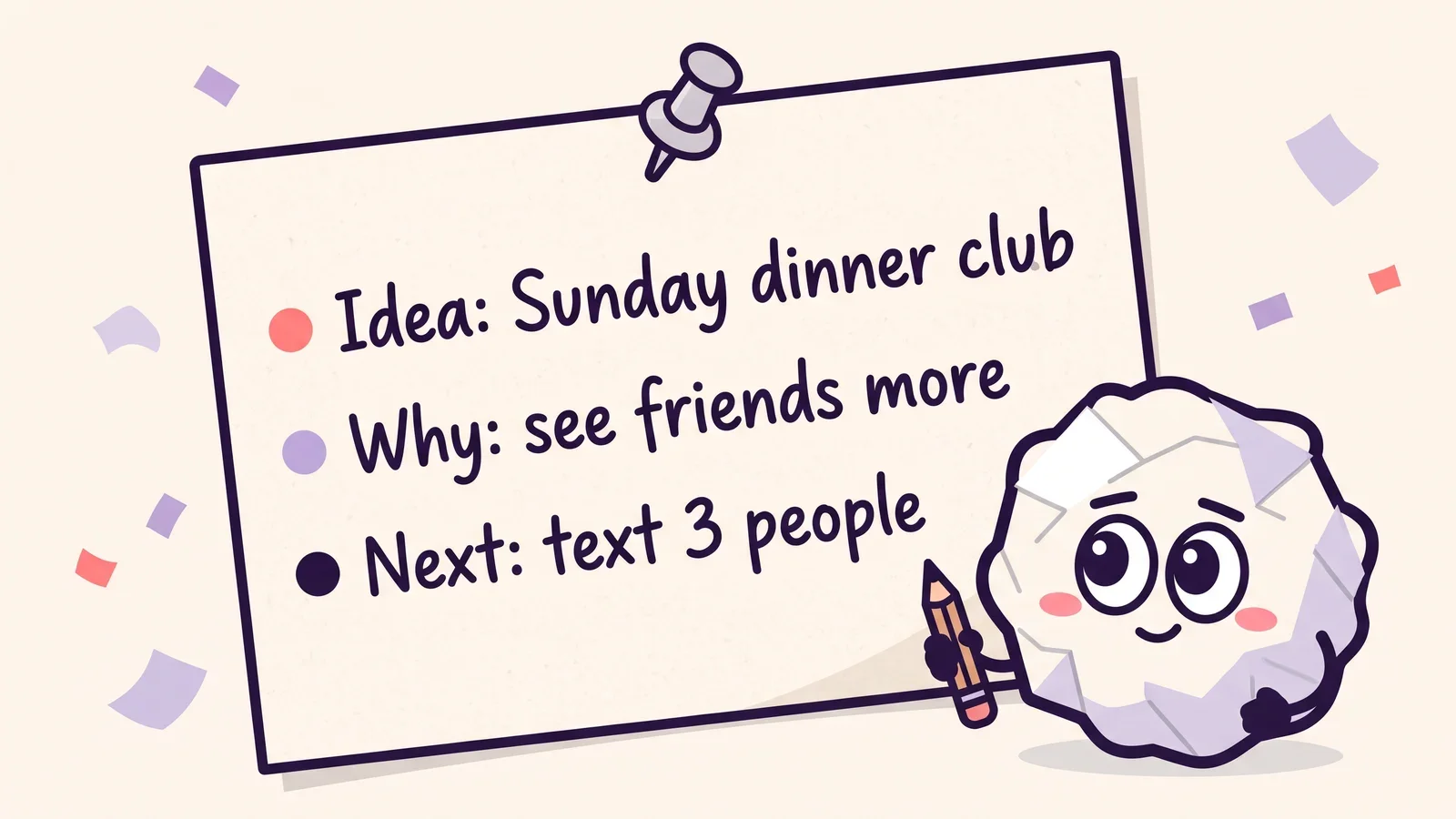
Here's an illustrative example, not a real captured thought:
"Idea: a Sunday dinner club, once a month, everyone brings one dish. Why: I want to see friends more without planning a big event. Next: text three people this week and ask if the last Sunday works."
Compare that with "dinner thing with friends." Both take seconds to say. Only one still makes sense in a month. A few habits make spoken captures far more useful:
- Say the words you'll search for. Names, places, project names and distinctive phrases become searchable when your note has a transcript. Our short post Leave a better note for future you has more examples.
- Add a photo when the visual matters. A storefront, a sketch or a page of handwritten notes can explain more than a spoken description. In Spitball you can add a photo or a place to a thought.
- One idea per recording. Five ideas in one long note are hard to find and hard to act on separately. Stop, save, and start a new one.
- Keep it short. Most ideas need under a minute. In Spitball, each thought can be up to 5 minutes long, which is plenty for an idea plus context.
- Check names that matter. Speech-to-text can get names, jargon and accents wrong. Spitball keeps the original audio alongside the transcript, so you can listen back when the text looks off.
Spitball transcribes English on your iPhone using Apple's on-device speech capabilities, with no cloud transcription fallback (see how on-device transcription works on iPhone). Support depends on your device, and a speech model may need to download the first time. If a transcript isn't available, the recording is still saved. Our guide to transcribing voice memos on iPhone covers getting more accurate transcripts.
Where should your captured ideas live?
Your ideas should live in one place that is fast to open, easy to search, and trustworthy enough that you stop trying to remember things yourself. The research above is clear that offloading only helps when you trust where things go.
Before you commit to a capture tool, run it through five questions:
- Can I start capturing in a few seconds, ideally with one press or one tap, without unlocking three menus?
- Can I find things again? Search across titles and transcripts matters more than folders when you have hundreds of notes.
- Does it keep the original? For voice notes, keeping the audio alongside the transcript protects you from transcription mistakes.
- Is it private enough for half-formed thoughts? Know where your notes are stored, whether you need an account, and what's sent anywhere. Our checklist on what makes a notes app private walks through it.
- Will it survive a new phone? Know how the app syncs or backs up before you need it. See how to back up voice notes and move them to a new iPhone.
For reference, here is how Spitball answers those questions, from its published support and privacy pages: capture in the app or with an Action button press and hold; search for a word you remember; each thought keeps its transcript and original audio, and you can add a photo or a place. Your library is stored on your iPhone by default, with optional iCloud Sync using your own Apple Account, and there's no Spitball account to create. Optional analytics start off; if you turn them on, they send limited usage events, and TestFlight separately sends Apple's beta diagnostics. The details are on the privacy page.
Whatever you choose, choose one. A single imperfect inbox you trust beats three good ones you have to check.
How often should you review your captured ideas?
Review your captured ideas once a week, for about 15 minutes, at a fixed time. Weekly is frequent enough that ideas still make sense and short enough that you'll keep doing it.

A weekly review that works for most people:
- Open your inbox and go through everything from the past week. Read the transcript first; replay the audio only when the text is unclear.
- Sort each idea into one of three piles: act on it (it has a clear next step), park it (interesting, not now), or let it go.
- For "act" ideas, write the next step somewhere you'll see it, such as your calendar or task list. Be specific: "text Sam and Priya about the last Sunday" rather than "dinner club."
- For "park" ideas, add a word you'll search for later if the original capture doesn't have one.
- Let the rest go without guilt. Most captured ideas aren't meant to become projects. Capturing them is what let you stop thinking about them.
Some people add a two-minute daily skim, usually at the end of the day. It's optional. If you only keep one review, keep the weekly one. Put it on your calendar like a meeting; reviews that depend on remembering to do them are exactly the kind of intention that slips.
How do you turn a captured idea into a next step?
You turn an idea into action by deciding one specific next step, with a when or where attached, and writing it down. A specific plan is also what lets your mind stop circling the idea.
This is the most practical finding from Masicampo and Baumeister's research. Letting participants "formulate specific plans for their unfulfilled goals eliminated the various activation and interference effects" (Masicampo & Baumeister, 2011). In other words, you don't have to finish something to stop thinking about it. You have to make a credible plan for it. The authors also found that the relief depended on how earnest the plans were. Vague plans you don't intend to follow don't count.
Good next steps share three traits:
- Physical: something you can actually do, like "send a text," "sketch three layouts" or "book 30 minutes."
- Small: doable in one sitting, ideally under 30 minutes.
- Anchored: tied to a time or place, such as "Thursday after lunch" or "next time I'm at my desk."
Not every idea should become a task. Some ideas are seeds: a phrase for a song, an observation, a question you want to sit with. Those belong in the "park" pile, searchable for later. If you write songs, our guide to recording song ideas on iPhone has a naming system built for that kind of library.
How do you capture ideas in awkward places?
In awkward places, capture the smallest useful version of the idea as soon as it's safe, and fill in the context later. A three-word placeholder beats a perfect note you never made.
- On a walk: this is where voice capture shines. Stop for a moment, press and hold, say the idea and why, and keep walking.
- In the shower: repeat the idea to yourself in a few key words, then capture it the moment you're out. Keep your phone outside the bathroom's splash zone.
- In bed: whisper a short voice note, or type a few words with the screen dimmed. Don't try to develop the idea at 2 a.m.; just get it out of your head.
- In a meeting or class: type a few words rather than speaking. If you want to record other people, ask first. Spitball's terms ask you to get any consent required when you record others.
- Driving: don't handle your phone. Hold the idea with a word or two, and capture it when you've safely stopped.
- At the gym or cooking: hands are busy, so a single press of a physical button and a few spoken words is about as much as you can manage. That's enough.
The common thread is lowering the bar. In hard moments, capture a pointer to the idea, not the idea fully formed. Your weekly review is where you expand it.
How do I start? A 7-day idea-capture routine
Start with one capture method and one review slot, and practice each step for a week. Seven days is enough to find out what sticks without over-engineering anything.
- Day 1: Pick your inbox. Choose one app for all ideas and put it on your first Home Screen, or assign it to the Action button if your iPhone has one.
- Day 2: Capture everything. Every idea, however small, goes in. Aim for at least three captures. Quantity first.
- Day 3: Add the "why." For each new capture, say the idea and one reason it matters.
- Day 4: Add the "next." Practice ending each capture with a possible next step, even "maybe ask Alex."
- Day 5: Try one awkward place. Capture on a walk, after a shower or in bed, using the smallest-useful-version rule.
- Day 6: Search. Find an idea from Day 2 using only a word you remember. If you can't, adjust what you say when you capture.
- Day 7: Do your first weekly review. Sort into act, park and let go, and schedule next week's review before you close the app.
After a week, keep what worked and drop what didn't. The routine isn't the point. The point is that ideas stop slipping away, and the good ones start turning into things you do.
Which iPhone apps can you use to capture ideas?
Any tool that's fast to open, searchable and trustworthy works. On iPhone, the main options are Apple's Voice Memos, typed notes in Apple Notes, and dedicated capture apps like Spitball. For a full rundown of every way to record on iPhone, see our guide to voice notes on iPhone. To compare them side by side, see Voice Memos vs Notes vs Spitball.
- Voice Memos suits longer recordings and anyone who wants Apple's built-in app; with Voice Memos turned on in iCloud settings, recordings stay up to date on your iPhone, iPad and Mac signed in to the same Apple Account (Apple: Keep recordings up to date).
- Apple Notes suits people who think in text and want ideas next to other written notes.
- Spitball (our app) is built for quick thoughts: record or type, keep the transcript and original audio together, add a photo or place, and capture with the Action button. Each thought can be up to 5 minutes long, and transcription is English only. Spitball is iPhone only today.
Questions about capturing ideas in Spitball? Start with Support, or DM Nik, Spitball's developer, at @sharma on Instagram. For Apple's own steps, see its guides to the Action button and making a recording in Voice Memos.
Want one place for every idea? Spitball is currently in beta through Apple's TestFlight. You'll need iOS 17 or later, and beta places are limited. It's free right now, and builds can expire. Get the Spitball beta.
A FEW MORE ANSWERS
Good questions.
What's the best way to capture ideas quickly?
Use the method that starts in the fewest steps, and use the same one every time. On iPhone that usually means a voice note started from the Action button or a Home Screen app, because speaking is faster than typing and works while you're moving. Type instead when you're somewhere you can't talk, such as a meeting or a quiet train.
Is it better to write or speak your ideas?
Speak when speed matters and write when you need to think in structure. In a lab study on an iPhone 6 Plus using Baidu's Deep Speech 2 recognizer, English speech input was about three times faster than the on-screen keyboard. Spoken notes also capture tone. Written notes are easier to skim, which is why voice notes with transcripts give you some of both.
How do I organize ideas I've captured?
Don't organize at capture time. Send every idea to one inbox, then sort during a weekly review into three groups: act on it, park it for later, or let it go. Searchable words in each note matter more than folders, so say names, places and project words out loud when you record.
How often should I review my ideas?
Once a week for about 15 minutes is a good default, scheduled on your calendar like a meeting. A week is short enough that you still remember what each note meant, and long enough to batch the sorting. A short end-of-day skim is a nice extra, but if you only keep one habit, keep the weekly review.
Should every idea become a task?
No. Most ideas are worth capturing but not worth doing, and some are seeds you want to keep without acting yet. Give an idea a next step only when it earns one in your review. Capturing the rest still helps, because it lets you stop holding them in your head.
Why do I forget my ideas so quickly?
Because the memory that holds a new thought is small and easily interrupted. Psychologist Nelson Cowan's review puts its central limit at about four chunks on average, so a conversation or a notification can push a fresh idea out before it's stored. Unfinished ideas also keep nagging: Masicampo and Baumeister found that unfulfilled goals caused intrusive thoughts during unrelated reading. Capturing the idea, and giving it a plan, lets your mind let go.
Who makes Spitball?
Spitball is developed by Nik Sharma and published by Long Wknd LLC. Nik founded and later sold Sharma Brands and hosts the Limited Supply podcast. Questions about the app can go to Spitball Support or to @sharma on Instagram.

WRITTEN BY
Nik Sharma
Nik is an entrepreneur, active investor, and the founder of Spitball. He writes about building businesses, practical AI, and catching ideas before they disappear.